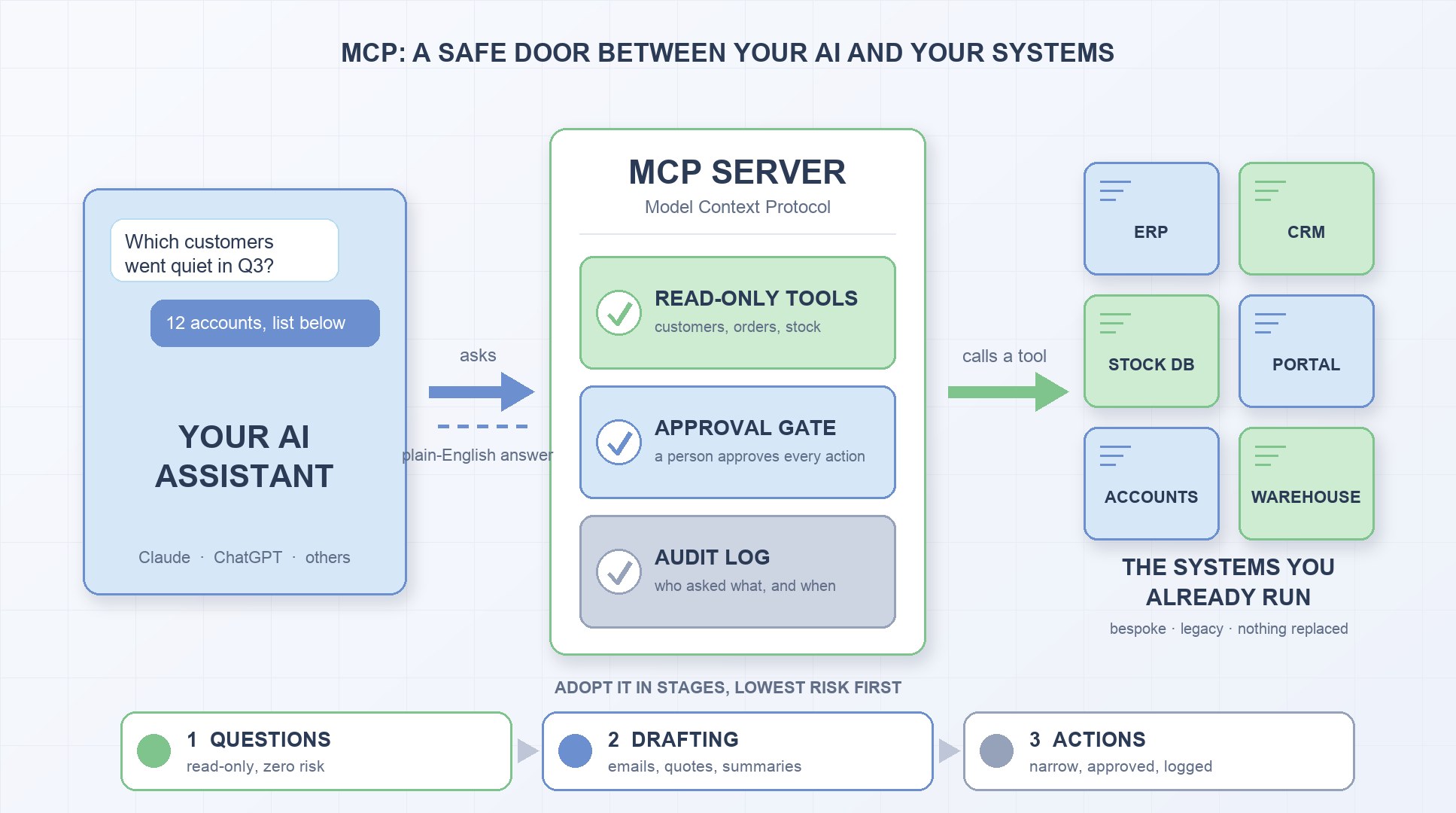
Your team already uses ChatGPT or Claude every day. Ask it to draft an email, summarise a contract or explain a spreadsheet formula, and it does a decent job.
Then ask it something that actually matters to the business:
- “Which customers haven’t ordered in the last 90 days?”
- “What’s on back-order, and who is waiting for it?”
- “What was our margin on last month’s biggest job?”
And it can’t answer. Not because it isn’t clever enough, but because it can’t see your systems. The ERP, the CRM, the stock database, the customer portal an agency built in 2016: none of it is visible to the AI.
MCP is the standard that fixes that.
This post explains what it is in plain language, what it changes for a small or medium business, and how to adopt it without handing an AI the keys to your database.
What MCP actually is
MCP stands for Model Context Protocol. It’s an open standard, published in late 2024 and now supported by Claude, ChatGPT and most other AI tools, that defines how an AI assistant talks to external systems.
The simplest way to think about it: MCP is a USB port for AI.
Before USB, every device needed its own cable and its own driver. After USB, anything could plug into anything. MCP does the same for AI. Instead of every AI vendor building a custom integration for every piece of software, there is one standard way to expose a system to an AI.
In practice it has two sides:
- an MCP server: a small piece of software that sits next to your system and exposes a set of named “tools”, for example look up customer, list open orders, check stock level
- an MCP client: the AI assistant your team already uses, which discovers those tools and calls them when a question needs them
When someone asks “which customers haven’t ordered since June?”, the assistant sees it has a list customers by last order date tool, calls it, gets the data back, and answers in plain English.
The AI never connects to your database directly. It only sees the tools you chose to expose. That one sentence is the whole security model, and we’ll come back to it.
Why this matters most for businesses with custom or legacy systems
If your whole business runs on Xero, HubSpot and Google Workspace, you can probably stop reading. The vendors ship MCP connectors for those, and they’re a settings toggle away.
The businesses that benefit most are the ones with:
- a bespoke system built in-house or by an agency
- an ERP or accounts package with years of customisation layered on top
- a SQL database with fifteen years of business logic in stored procedures
- a trade portal, a warehouse system and a courier integration that only agree with each other approximately
No off-the-shelf connector exists for those, and none ever will. Until recently, “connecting AI” to them meant a bespoke integration for each AI vendor, rebuilt every time the vendor changed its API. With MCP you build one server over your system, and every AI tool can use it.
What it looks like in a real business
Here is the progression we recommend, in order of risk.
Stage 1: Questions over live data (read-only)
The MCP server exposes a handful of read-only tools: customer lookup, order history, stock levels, open purchase orders, margin by order line.
Now the owner, the ops manager and the sales team can ask:
- “Show me customers whose ordering pattern has dropped this quarter.”
- “What’s on stock hold, and which orders does it block?”
- “Which lines did the supplier price go up on where we didn’t change the sell price?”
Each of those is currently a report someone exports, merges in Excel and sends back tomorrow. With MCP it’s a thirty-second conversation. Nothing is written, so the risk is close to zero.
Stage 2: Drafting and triage
The assistant sees an incoming email (“where’s my order?”, “can you quote 500 of these?”) and drafts a reply using live order status, stock and that customer’s price list. A person reads it and presses send.
The same applies to chasing late suppliers, explaining a short delivery, or preparing the Monday summary of what’s late, what’s short and who is over their credit limit. This is where most of the saved hours come from.
Stage 3: Actions behind approval gates
Only now do you add tools that change things, and each one is narrow:
- create a draft purchase order from reorder points and recent demand
- release a credit hold
- apply a supplier price update to cost prices and propose new sell prices with the margin impact shown
Every one of these stops for a human to approve. The AI proposes; a person decides.
The business benefits, honestly stated
Answers in seconds, not days
The questions that used to take a day of someone’s time now take a sentence. That’s the obvious win, and it’s real.
Less knowledge locked in heads
Today, “how do we work out the true margin on a job?” lives in two or three people. Once the rules are encoded as tools, the answer is available to anyone with permission, even when those people are on holiday.
One integration, every AI
Build the MCP server once. Claude, ChatGPT and whatever comes next can all use it. You’re not betting on a vendor.
No replatforming
Nothing gets replaced. The legacy system keeps running exactly as it does today. MCP sits beside it, not instead of it. That makes this one of the cheapest modernisation steps available, because it doesn’t touch the thing that already works.
Your team keeps control
Done properly, people see every answer’s source and approve every action. It feels less like “the AI is running the business” and more like “the AI finally has the same access as a trusted junior”.
What “safely” means, concretely
This is the part a DIY attempt or a cheap agency usually skips, and it’s the part a business owner should insist on.
- Read-only by default. Most tools should stay read-only forever.
- Narrow, explicit writes. “Create a draft purchase order”, never “run this SQL”.
- Per-user permissions. A sales rep sees their accounts, not the whole debtor book.
- Approval gates on every write. Nothing changes in your system without a person saying yes.
- An audit trail. Every question asked and every action proposed is logged, with who asked it.
- Minimal personal data. The AI needs order and stock data, not customers’ home addresses in a chat log.
- Cost ceilings. A runaway loop can’t rack up a surprise bill.
None of this is hard. It’s just the boring part, and it’s the part that lets you sleep.
Common mistakes (and how to avoid them)
Mistake 1: Giving the AI a database connection
It feels like a shortcut. It’s a liability.
Fix: expose named tools with defined inputs and outputs. The AI never sees a connection string.
Mistake 2: Starting with actions
The demo that writes to the live system is impressive right up until it isn’t.
Fix: reads first. Prove value with zero risk, then add one narrow write at a time.
Mistake 3: Exposing everything “to be flexible”
More tools means more surface area and worse answers, because the AI has to guess which one to use.
Fix: start with the five questions that cost the most time, and build tools for those.
Mistake 4: No audit log
If you can’t see what the AI did, you can’t trust it, and neither can your accountant.
Fix: log every call before you expose the first tool.
Mistake 5: Treating it as an IT project
The owner and the ops manager know which questions matter. The developer knows which tables hold the answers. You need both in the room.
Fix: start from the business questions, not the schema.
What to ask before you start
If your team or a supplier proposes connecting AI to your systems, ask:
- Which question costs us the most time to answer today?
- Which system holds the answer, and who actually understands it?
- What must the AI never be able to see or change?
- Who approves actions, and how will we know what the AI did?
- What is the smallest first connection that would prove the value?
These questions keep the project grounded in outcomes rather than in whichever AI feature was announced this week.
The takeaway
MCP removes the technical excuse. Your AI can see your systems now, if you let it, through a door you control.
The question is no longer “can we?” but “what first, and how safely?”
Start with reads. Keep writes behind a person. Log everything. Add one tool at a time.
You don’t need a new system to get the benefit. You need a safe way to connect the one you already have.
Not sure whether your systems can be connected?
Book a free 30-minute assessment call. Tell us what you run, and we’ll say whether it can be connected, what’s safe to expose, and roughly what the first step would involve. No slide deck, no obligation.